Detail Finder Enterprise
PlatformSolutionsResourcesSecurityFAQContact
Sign inBook a Demo
Trusted engineering search for structural teams

Find the right structural detail in seconds.

Search by keyword, image metadata and approved engineering classifications to surface reusable details fast — without digging through folders or opening twenty PDFs.

10 approved details found
Approved
F22
Book a DemoSee How It Works
Search Library
Secure workspaceAnonymized
Detail Finder Search Library visual search results

Search naturally

"edge foundation detail"

Filter visually

Category, type and approval context stay in view.

Reuse confidently

Approved details are easy to identify without opening 20 PDFs.

01

Search naturally

02

Browse visual matches

03

Filter by category

04

Open approved detail

05

Reuse confidently

The Problem

Your best details already exist. They just disappear into project history.

Structural teams already create valuable precedent. The trouble is not whether it exists. The trouble is whether the next engineer can find it, trust it and reuse it without starting from scratch.

What breaks

Search becomes guesswork, approval history disappears, and detail libraries drift out of sync with the way teams really work.

What it costs

Time is lost, work gets recreated, standards become harder to repeat and knowledge leaves with projects or people.

Why Detail Finder exists

Engineering firms do not lose details. They lose the ability to find the right approved detail when the next project needs it. As projects multiply, folders grow, standards evolve and teams change, reuse becomes slower and less reliable than it should be.

PDF folders

Engineering drawing details are buried in project PDF folders with little context for the next team that needs them.

Network drives

File structures help store projects, but they do not make approved engineering details easy to discover and reuse.

Email chains

The reasoning behind decisions is often spread across conversations that are hard to find when a project moves on.

Tribal knowledge

Experienced engineers carry important standards and precedent that should be available to the whole firm.

Why existing detail libraries stop working

Storage is not the same as findability.

Most firms already have folders, PDFs and project archives. The problem is that those systems were built to store files, not help engineers quickly find a trusted detail to reuse.

Today
Detail Finder
Search folders
Search approved details
Open PDFs one by one
Instant visual preview
Ask coworkers what to trust
Use one searchable library
Redraw familiar details
Reuse approved precedent

Time

Engineers spend valuable project time hunting through folders and past drawings for details that should be easy to find.

Risk

When the right precedent is difficult to locate, teams may work from incomplete context or inconsistent information.

Rework

Established engineering drawing details are recreated when previous approved work cannot be found and reviewed.

Knowledge loss

As experienced engineers retire or move on, the reasoning behind familiar details can disappear with them.

How Detail Finder works

A workflow built around trust, not just search.

Capture details, let AI assist with preparation, keep approval with engineers and return trusted precedent to the next project.

01

Capture

Add engineering drawing details to a single queue.

New detail · Ready for review

02

AI review assistance

AI helps prepare a detail for the review workflow.

Review assistance · Prepared

03

Engineer approval

An engineer reviews and approves the detail before it is reused.

Status · Approved

04

Search

Find approved engineering details when a project needs them.

Search library · Stair detail

05

Reuse

Bring approved precedent back into the next engineering workflow.

Approved detail · Reused

app.detailfinder.ai/capture
Detail Finder
Search LibraryReviewBatch UploadAnalyticsAdministration
Capture
••

••••••

National Manager

Batch Upload

Capture snippets from drawings and prepare them for review.

Capture guide

1Snip a single detail
2Paste directly
3Add project context
4Send for review

Paste, drag or drop a detail

One cropped engineering detail per item. Prepared for structured review.

Ready checks

Single detail in frame
Project reference attached
Metadata prepared
Review queue ready
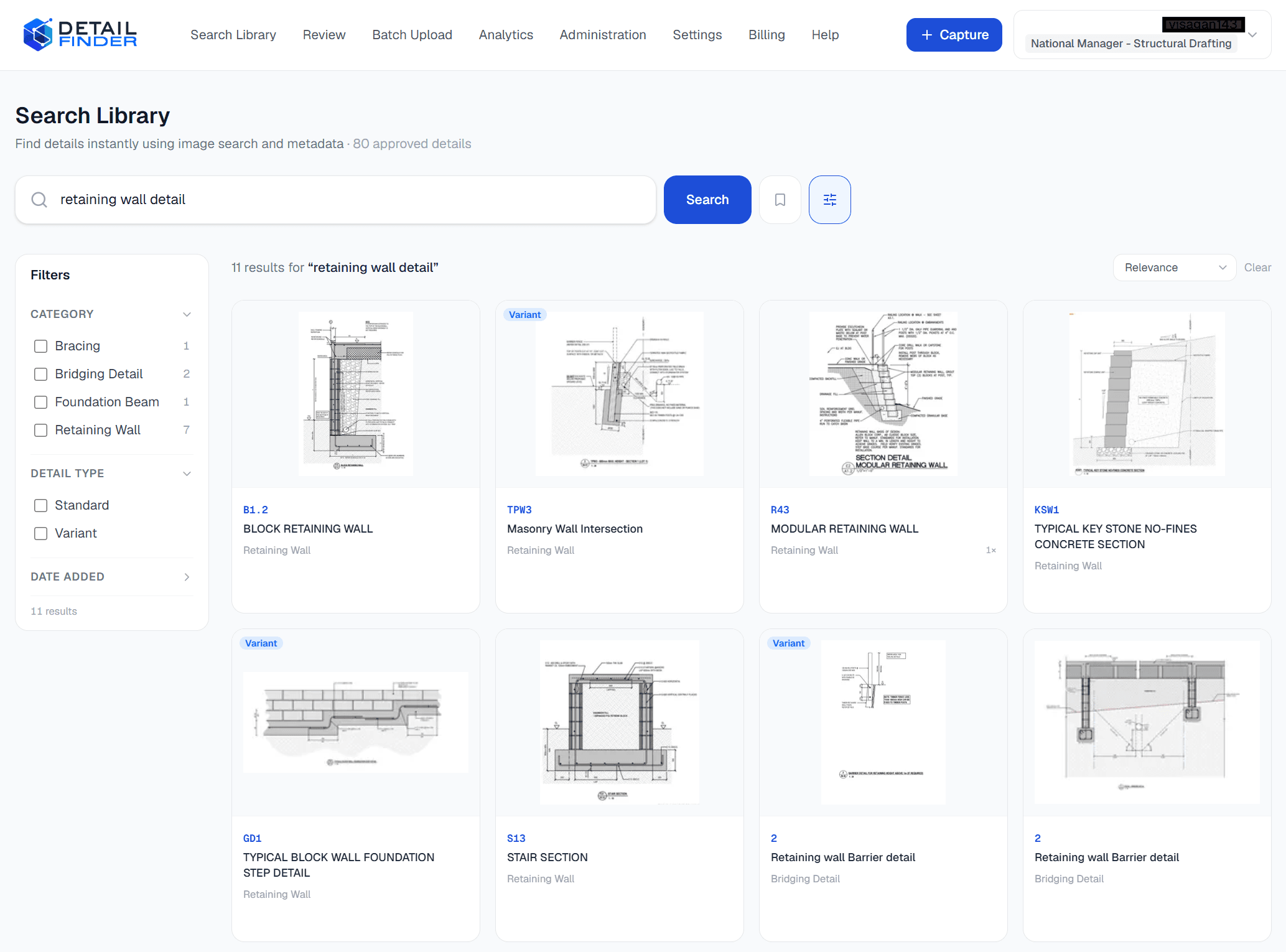
app.detailfinder.ai/search
Detail Finder
Search LibraryReviewBatch UploadAnalyticsAdministration
Capture
••

••••••

National Manager

Search Library

Find approved engineering details across your library.

Search details… (/ or ⌘K)
Search

Search the library

bottom plate connection

Engineering details

B7

STAIR TO PFC BEAM 'BF.1' CONNECTION DETAIL

Approved1 week ago
KSW1

TYPICAL KEY STONE NO-FINES CONCRETE SECTION

Approved1 week ago
F39

TYP. NURAJACK TIMBER POST DETAIL

Approved1 week ago
S100

TYPICAL BOTTOM PLATE CONNECTION

Approved2 weeks ago
VP01

VERANDAH POST TO MASONRY BLOCK WALL DETAIL

Approved2 weeks ago
Business outcomes

Why teams would switch from folders and PDFs.

The value is operational: find approved details faster, avoid repeat work, keep standards visible and preserve knowledge as projects and people change.

Reduce drafting time

Make approved engineering drawing details easier to find before work is recreated.

Reduce rework

Bring established precedent into the workflow instead of starting from scattered files.

Standardise engineering details

Use a review and approval process to support more consistent engineering standards.

Preserve engineering knowledge

Keep approved details available to the team as people and projects change.

Platform

The search experience is the payoff. The platform makes it possible.

Search is where teams feel the value. Capture, review, analytics and administration are what keep the library trusted over time.

Bring new details into one place.

Batch Upload is designed for engineering detail snippets, not generic file dumping.

  • Paste from clipboard
  • Project context captured
  • Prepared for review
app.detailfinder.ai/capture
Detail Finder
Search LibraryReviewBatch UploadAnalyticsAdministration
Capture
••

••••••

National Manager

Batch Upload

Capture snippets from drawings and prepare them for review.

Capture guide

1Snip a single detail
2Paste directly
3Add project context
4Send for review

Paste, drag or drop a detail

One cropped engineering detail per item. Prepared for structured review.

Ready checks

Single detail in frame
Project reference attached
Metadata prepared
Review queue ready
Security

Enterprise controls are part of the product, not an afterthought.

Administration already shows the platform thinking about access, audit, tenant separation, library health and operational quality.

Role-based access

Control who can access and work with engineering details.

Audit trail

Keep a clear record of activity across the engineering workflow.

Tenant isolation

Keep each organisation’s workspace separated.

Professional administration

Give administrators the controls they need to manage the platform.

app.detailfinder.ai/admin
Detail Finder
Search LibraryReviewBatch UploadAnalyticsAdministration
Capture
••

••••••

National Manager

Administration

Manage library health, roles, audit and operational quality.

Library health

100%
Search index coverage100%
Metadata coverage100%
Approved details79

Workspace controls

Users
Details
Invitations
Roles
Categories
Audit Log
AI assistance

AI supports the workflow. Engineers keep the final word.

Keep AI in a supporting role. It can help prepare details and metadata, but approval and reuse still depend on engineering judgement.

AI prepares

AI provides assistance as details enter the review workflow.

Engineer reviews

Engineering judgement remains responsible for what is approved.

Approved knowledge becomes searchable

Once approved, details are available for teams to find and reuse.

FAQ

Questions teams ask before they trust a new workflow.

Clear answers matter when approved engineering knowledge is involved.

What is Detail Finder Enterprise?

Detail Finder Enterprise is engineering detail management for structural engineering teams. The current workflow is focused on capturing, reviewing, approving and finding engineering drawing details.

Does AI replace engineering judgement?

No. Current product language states that AI assists engineers and that engineering judgement remains responsible for what is approved.

What happens before details are reused?

The current workflow puts details through review and engineer approval before they are treated as approved precedent for reuse.

What parts of the platform are visible today?

The current application evidence includes Batch Upload, Review, Search Library, Analytics and Administration.

See the workflow with your own library in mind.

A demo should focus on how your team captures details today, how approval works and what a trusted Search Library would need to look like in practice.

Book a Demo

Focused on your current workflow

Grounded in the real product

Built around approved detail reuse

Detail Finder Enterprise

Engineering detail management for structural engineering teams. Capture, review, approve and find engineering drawing details.

Product

PlatformSolutionsSecurityFAQ

Company

ResourcesContactBook a demo

© 2026 Detail Finder Enterprise. All rights reserved.

Sign in to app